
 Search
From February 16 – May 16, 2026, your patients or clients can earn a $50 or $100 statement credit when they complete the steps below.

1. Open a new CareCredit credit card account.
Your patients
or clients can go to carecredit.com/offer2026, scan the QR code, or call
800-677-0718 to apply for the CareCredit credit card.** There's no hard credit check with
prequalification. Applying is fast and the decision is instant.

2. Spend to earn a statement credit.
They use their new
card to pay for qualifying in-network purchase(s) totaling $300 - $999.99 to earn a $50 statement
credit or $1,000+ to earn a $100 statement credit.

3. Register for this offer online.
They
go to carecredit.com/promotions, enter promo code
OFFER2026, and complete the registration form.
All steps must be completed by May 16, 2026.
If
earned, statement credit will post to account within 3 billing cycles of offer end date.
In-Practice Materials
We created these attractive in-practice materials to help you inform your patients or clients about this exciting limited-time offer. Remember, only cardholders who open a new account and complete the above steps between February 16 and May 16, 2026, are eligible to redeem this special offer.
Kit includes:

Kit (Item #185-024-00) includes:
Easel Display
Perfect for your reception desk or waiting rooms.
Pop-out sign
Adhere to the front of a shelf or the back of a reception-desk monitor.
Sticker Sheet
Place stickers on displays, invoices, and more.
How to order:
- Click the Order Kit button below and log in to Provider Center
- Select the box that reads Order: Ready-to-Use Marketing Materials
- You will see a pop-up saying that you are now leaving carecredit.com. Click OK.
- Scroll down and select the marketing materials you would like to order.
Shareable Resources
Let your patients or clients know about this exciting offer with these easy-to-use assets.
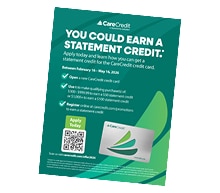
Offer Flyer
Email Copy and Images

Website Banners

Download this digital banner and add it to your website so your patients or clients can learn about this special offer.
Social Media
Copy and paste this prewritten content for X, Facebook or Instagram, so your followers can learn more about this limited-time offer. Captions (Options; Mix and Match w/ Images)
Option 1 Option 2 Option 3How to add a call to action (CTA) to your post
NOTE: All social media posts about the offer MUST include the CTA text.
Posting on Instagram:
- Select “Edit profile” in your practice’s account settings.
- Scroll down to the “Links” box and paste carecredit.com/offer2026
- Add the prewritten content to your post.
- [CTA added to the end of your post] Learn how at the link in our bio!
Posting on Facebook, LinkedIn and X:
- Add the prewritten content to the post.
- [CTA added to the end of your post] Learn more and apply at carecredit.com/offer2026.
Social Media Images

Suggested Hashtags
Remember to add a #hashtag or two in your posts. Here
are a few options to get you started:
#CareCredit
#CareCreditForCare
#MyCareWithCareCredit
Advertising Instructions
- Instructions for Email Assets
- Instructions for Website Banners
- Instructions for Social Media
- Instructions for Flyer
Copy all of the content and paste it directly into an email. Please do not edit this content in any way. Use images as you see fit.
Download and place on your website homepage or financing page so your patients or clients can quickly access the full offer details.
Copy and paste into your social media channels to provide your patients or clients with a direct link to the offer information.
Print out a stack and hand them out to patients or clients so they can easily learn about the offer information at home.