
 Search
From September 1 - October 31, 2026, your patients or clients can earn a $50 or $100 statement credit when they complete the steps below.

1. Open a new CareCredit credit card account.
Your patients
or clients can go to carecredit.com/offer2026, scan the QR code, or call
800-677-0718 to apply for the CareCredit credit card.** There's no hard credit check with
prequalification. Applying is fast and the decision is instant.

2. Spend to earn a statement credit.
They use their new
card to pay for in-network purchase(s) totaling $300 - $999.99 to earn a $50 statement
credit or $1,000+ to earn a $100 statement credit.

3. Register for this offer online.
They go to carecredit.com/promotions, enter promo code
OFFER2026, and complete the registration form.
All steps must be completed by October 31, 2026.
If
earned, statement credit will post to account within 3 billing cycles of offer end date.
In-Practice Materials
We created these attractive in-practice materials to help you inform your patients or clients about this exciting limited-time offer. Remember, only patients or clients who open a new account and complete the above steps between September 1 - October 31, 2026, are eligible to redeem this special offer.

What’s included and 2 ways to order your kit:
-
Order Offer Materials with Custom QR Code:
- Log in
- Click Order Custom QR code Materials with your custom QR code
-
Kit includes:
- Easel Display: Perfect for your reception desk or waiting rooms.
- Sticker Sheet: Place stickers on displays, invoices, and more.
-
Order Offer Materials with Generic QR Code:
- Log in
- Click Order pre-printed Marketing Materials with a generic QR code
-
Kit (Item #185-024-00) includes:
- Easel Display: Perfect for your reception desk or waiting rooms.
- Pop-out sign: Adhere to the front of a shelf or the back of a reception desk monitor.
- Sticker Sheet: Place stickers on displays, invoices, and more.
-
Both options are a free service to you - allow 1-2 weeks for processing & delivery.
Printable Resources
Offer Flyer
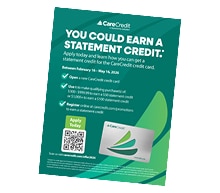
Download Offer Flyer with custom QR Code to display or hand out.
Download Offer Flyer with NO QR Code to display or hand out.
Shareable Resources
Let your patients or clients know about this exciting offer with these easy-to-use assets.
Email Copy and Images

Website Banners

Download this digital banner and add it to your website so your patients or clients can learn about this special offer.
Social Media
Copy and paste this prewritten content for X, Facebook or Instagram, so your followers can learn more about this limited-time offer. Captions (Options; Mix and Match w/ Images)
Option 1 Option 2 Option 3 Option 4How to add a call to action (CTA) to your post
NOTE: All social media posts about the offer MUST include the CTA text.
Posting on Instagram:
- Select “Edit profile” in your practice’s account settings.
- Scroll down to the “Links” box and paste carecredit.com/offer2026
- Add the prewritten content to your post.
- [CTA added to the end of your post] Learn how at the link in our bio!
Posting on Facebook, LinkedIn and X:
- Add the prewritten content to the post.
- [CTA added to the end of your post] Learn more and apply at carecredit.com/offer2026.
Social Media Images

Suggested Hashtags
Remember to add a #hashtag or two in your posts. Here
are a few options to get you started:
#CareCredit
#CareCreditForCare
#MyCareWithCareCredit
Advertising Instructions
- Instructions for Email Assets
- Instructions for Website Banners
- Instructions for Social Media
- Instructions for Flyer
Copy all of the content and paste it directly into an email. Please do not edit this content in any way. Use images as you see fit.
Download and place on your website homepage or financing page so your patients or clients can quickly access the full offer details.
Copy and paste into your social media channels to provide your patients or clients with a direct link to the offer information.
Print out a stack and hand them out to patients or clients so they can easily learn about the offer information at home.